
Zendesk Bridge:
How AI agents outside Zendesk handle tickets and orders
Zendesk Bridge connects AI agents like ChatGPT, Claude and Copilot to Zendesk over MCP and A2A. Here's how it works, how it governs what each agent can do, what's in early access, and how those agents act on orders outside Zendesk.
Zendesk Bridge connects AI agents like ChatGPT, Claude and Copilot to Zendesk over MCP and A2A. Here's how it works, how it governs what each agent can do, what's in early access, and how those agents act on orders outside Zendesk.
In our Zendesk AI Summit 2026 recap, we called Zendesk Bridge the biggest move of the summit, and there was more to say about it than fits in a recap.
Zendesk Bridge lets AI agents that live outside Zendesk work inside it. ChatGPT, Claude, Microsoft Copilot or an agent you built yourself can read and update tickets, search the help center, run workflows and hand work to Zendesk's own AI agents. Zendesk calls it its "headless platform". It's in early access now, and free while it is.
This is the engineering view: what Bridge is, how it works, what's in early access, and the part Zendesk doesn't cover yet: getting those agents to the order itself, in whatever commerce platform it lives on.
What Zendesk Bridge really is about
Zendesk's launch post opens on a line we've been circling for months: "Service no longer has a single front door." A request can start in a customer's AI assistant, in an employee's workspace, or in an agent a business built for itself. Zendesk points to Gartner research showing customers are three times more likely to use their own AI tools than a company's chatbot.
Zendesk Bridge is how it meets them there. Two open protocols do the work:
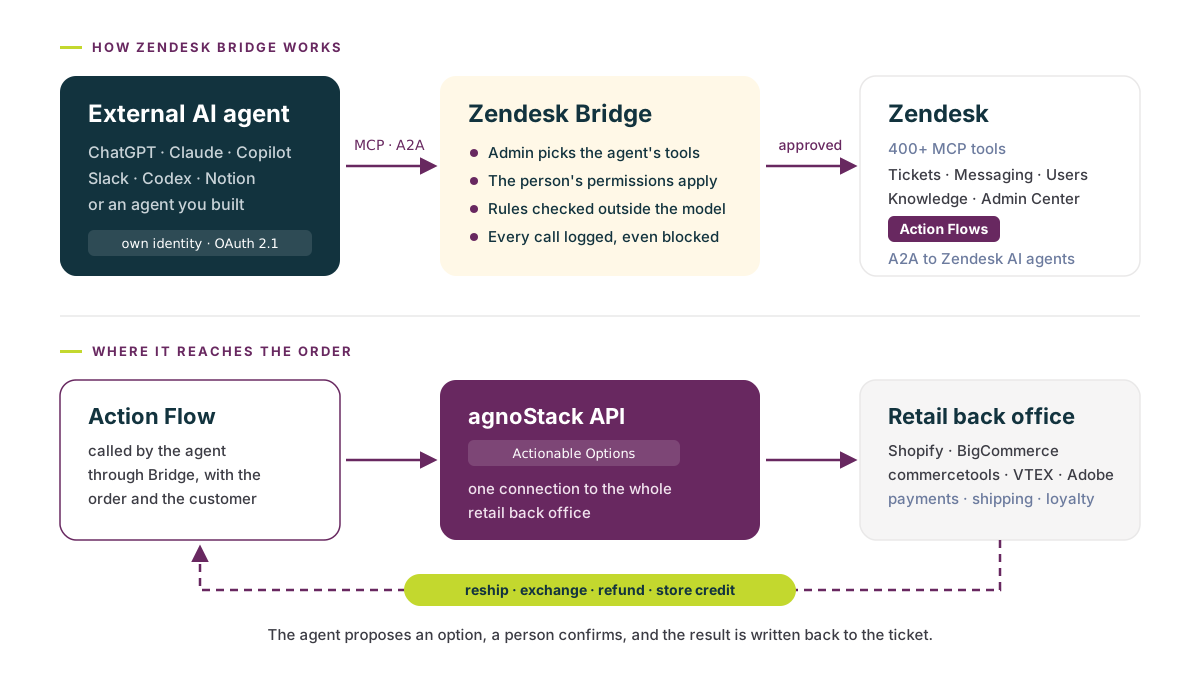
- MCP for tools. Through the Zendesk MCP server, an agent can use more than 400 tools, grouped into tickets, messaging, users and organizations, knowledge, Admin Center and Action Flows.
- A2A for delegation. An outside agent can hand harder service work to Zendesk's own AI agents, which do the task and report back the status and outcome while the outside agent keeps the conversation. (In early access, that's a single Monitoring agent that only recommends. More on that below.)
It works with the AI tools teams already use. Zendesk is launching plugins in the ChatGPT, Claude and Microsoft Copilot marketplaces, with Amazon Quick and Gemini next, plus prebuilt connections for Slack, Codex, Claude Code, Lovable and Notion. Any agent that signs in with standard OAuth can connect, including the ones you build.
One of Zendesk's own examples is a commerce one. A product team asks Codex to look through tickets for recurring problems. It finds that customers who change currency come back to an empty cart, drafts a Jira issue, and a manager approves it before it's created. Nobody opened Zendesk to do it, and nothing reached Jira without a person saying yes.
Bridge is more than an MCP server
It's tempting to read Bridge as a new name for Zendesk's MCP server. It isn't. The MCP server is the set of tools. Bridge is everything around it: who may use which tool, on whose behalf, and the record of what happened.
- One connection per agent. An admin registers each agent in Admin Center and describes the job it will do. Admin Copilot recommends tools for that job, and the admin chooses what to allow and which groups can use it. A new agent starts with no access at all.
- The agent's own identity. Agents sign in as themselves with OAuth 2.1. They never use a person's password or API token.
- The person's permissions, and no more. The person using the agent signs in too, and their Zendesk role still applies. Connecting an agent never gives anyone access they didn't already have.
- Rules enforced outside the model. This is the important one. The agent decides how to approach a task, but Zendesk checks every call against what the connection allows and what the person may do. The check holds even if someone prompts the agent to ignore a rule.
- A record of every call. For each transaction, admins see the agent, the person it acted for, the tool, the policy decision and the result. Blocked calls are logged too.
- An MCP URL per connection. Each connection's Setup tab hands you its MCP server URL. That's what your agent points at.
- A tool budget. Each provider gets a default cap of 30 tools, in line with Anthropic's guidance to stay under roughly 30 to 50. So "more than 400 tools" is the catalog, not what one agent loads at once, which is why Admin Copilot's tool recommendations matter.
Most of the agent protocols we've covered identify an agent or point it somewhere. Bridge is one of the first places where a platform decides, call by call, what an agent may actually do, and keeps the receipt. That's the part support needs, because a prompt can be talked out of a rule and a permission check in Zendesk can't.
Support without a person in the loop?
This is what makes Bridge exciting for support. If the rules live in Zendesk instead of in the prompt, a brand can let more agents in, from more places, without handing each of them the keys, and that's what support run by agents has been missing.
Zendesk is careful with it in early access, and we think that's right:
- Changes should need a yes. From what Zendesk has shared, an agent proposes a change and waits for a person to confirm it, with admins setting the approval thresholds. Where it's optional, we think it should be the default, at least to start.
- Delegation starts small. The only Zendesk AI agent available over A2A today is a new Monitoring agent, and it only makes recommendations.
- Customers are part of the plan. Agents can act for a signed-in user with their consent, or for anonymous users, and users can see and revoke which agents have access to their data.
Put next to Open Service Directory, the shape is getting clearer. OSD helps a shopper's assistant find a brand's real support. Bridge controls what an agent can do once it's inside. Zendesk hasn't said yet how the two connect when the agent asking for a return belongs to the shopper instead of the brand. That's the next piece we'll be watching.
What's in Zendesk Bridge early access
Bridge's open early access program started November 10. Admins sign up for the External AI EAP, then register agents in Admin Center, under AI and then External AI.
- Plans: every Zendesk Suite plan from Team up, plus Support Team, Professional and Enterprise.
- Price: free during early access. Zendesk says packaging and pricing may change at general availability.
- Metering: every interaction creates a billing-grade event with the agent, channel, skill and outcome, and billing phases in through general availability in 2027. The same events drive the audit log, which fits the outcome-based Outcome AI Platform pricing Zendesk announced alongside Bridge.
- Not yet: destructive actions, bulk exports and third-party integrations. Admin Center is read-only.
To help teams get started, Zendesk also published playbooks: tested prompts that have a connected agent audit your setup, propose a change, wait for approval, make only that change and check the result.
Where Bridge "meets the order"
Zendesk's product page shows an AI assistant using ticket history and a damaged-item policy to recommend a replacement. That's a great start. For a commerce brand, though, the replacement doesn't live in Zendesk. It's a new order in Shopify, BigCommerce, commercetools, VTEX or Adobe Commerce, a label from the 3PL, a refund through the payment provider and points to adjust in the loyalty program. Bridge's tools cover Zendesk, and the order lives somewhere else.
Action Flows are the way across. They're one of the tool groups in Bridge's catalog, and they're already how Zendesk AI agents and Custom Agents act on other systems. Here's the flow we're building toward at agnoStack:
- The agent calls an Action Flow. Any agent Bridge lets in, in ChatGPT, Claude, Copilot or one you built, calls a flow with the order and the customer.
- The flow asks agnoStack for the options. Actionable Options are an endpoint of the agnoStack API, now in early access. Given an order and a customer, it returns the next best actions for that situation.
- agnoStack asks the back office. Whichever commerce platform holds the order, plus payments, shipping, returns, subscriptions, loyalty and CRM. The options come back ready to run: reship, exchange, refund, store credit.
- The agent proposes, a person confirms. The flow runs the chosen option and writes the result back to the ticket.
Those are the same options a support agent already sees on the agnoStack Order Details panel in Zendesk today. The goal is for any agent Bridge lets in to get them too, on whatever commerce platform the brand runs. And with agnoStack's connectors for the Zendesk action builder close to general availability, asking for them will soon be one step in the flow instead of a custom integration.
Pricing is the part to press on. Bridge records a billing-grade event for every interaction, with the agent, channel, skill and outcome, but Zendesk hasn't published how those events turn into a bill. If you're joining the early access, these are the questions we'd ask:
- What counts as an interaction? One tool call, one agent turn, or one completed task?
- Do read-only and blocked calls count? The audit log records both.
- Who pays when work is delegated? If an outside agent hands a return to a Zendesk AI agent over A2A, is that billed as Bridge activity, as an outcome, or both?
- How do the meters stack? Action Flows no longer use action credits, and from February 1 Advanced Action Flows with AI steps cost $0.15 a run, unless an AI agent runs them. If an outside agent runs a refund through one, does that count as an AI agent running it, a Bridge interaction, an outcome, or some mix?
- What happens at general availability? Early access is free, and billing phases in through 2027. Will agents you connect now carry over on the same terms?
Bridge makes Zendesk the place where an agent's permissions live. Action Flows make it the place where an agent's actions on the back office live. Put the two together and a brand decides once what any agent may do with an order, and every agent plays by the same rules, inside Zendesk or out.
What's next
A few things worth doing now:
- Join the early access. It's free, and the read-only jobs, like ticket trends, recurring issues and help center gaps, are a safe place to start.
- Treat Action Flows as your agents' API. Every action you'd let an agent take on an order should be a flow: a clear input, one call to the system that does the work, and a note written back to the ticket. Whichever agent calls it, the rules and the record stay in Zendesk.
- Decide what an outside agent may do with an order. Tracking is an easy yes. Refunds, exchanges and address changes need a policy, and a person to confirm, before an agent asks.
Bridge brings the agents to Zendesk. The order still has to come to them, from whatever platform it lives on, and that's what we're building the agnoStack API to do. To join the agnoStack API EAP, email us at support@agnostack.com.
Sources
- https://www.zendesk.com/service/ai/ai-agents/zendesk-bridge/
- https://www.zendesk.com/blog/product-news/zendesk-bridge/
- https://support.zendesk.com/hc/en-us/articles/11485591370650-Announcing-Zendesk-Bridge
- https://support.zendesk.com/hc/en-us/articles/11398710406554-Understanding-Zendesk-Bridge-and-allowing-external-AI-agents-to-perform-actions-in-Zendesk-EAP
- https://support.zendesk.com/hc/en-us/articles/11458059060250
- https://support.zendesk.com/hc/en-us/articles/11400026079130-Connecting-external-AI-agents-to-Zendesk-EAP
- https://support.zendesk.com/hc/en-us/articles/11469226584986
- https://www.gartner.com/en/newsroom/press-releases/2026-07-08-gartner-survey-finds-customers-are-three-times-more-likely-to-use-third-party-genai-than-company-provided-chatbots-for-customer-service
- https://www.zendesk.com/blog/product-news/outcome-ai-platform/
- https://www.zendesk.com/blog/product-news/open-service-directory/
- https://agnostack.com/release-notes/release-number/6-0-0
- https://agnostack.com/release-notes/release-number/5-34-0#actionable-options
- https://support.zendesk.com/hc/en-us/articles/11490813998618-Announcing-the-end-of-action-credit-pricing-for-action-flows
- https://support.zendesk.com/hc/en-us/articles/11369598506266-Comparing-action-flows-and-advanced-action-flows
Keep reading
All posts →Blog
Zendesk Custom Agents: Specialized AI agents are only as good as the actions behind them
Zendesk introduced Specialized AI Agents on September 14: Industry Agents, starting with commerce, and Custom Agents built in Agent Builder. Here's what shipped, what's in early access, and what custom agents still need.

Blog
Zendesk Action Flows vs. Advanced Action Flows: Automating a Shopify return. How they stack up.
We automated a Shopify return flow using Zendesk Action Flows and Advanced Action Flows: what Admin Copilot and AI built, where each fell short, and what each costs, if the pricing holds still long enough to check.
Blog
Zendesk AI Summit 2026: Outcome AI Platform, Zendesk Bridge, and the Open Service Directory
Zendesk Bridge brings Zendesk to AI agents like ChatGPT and Claude, alongside Specialized AI Agents for retail, outcome-based pricing with Zendesk Unlimited, and what the Open Service Directory means for the future of CX.