Zendesk Action Flows vs. Advanced Action Flows:
Automating a Shopify return. How they stack up.
We automated a Shopify return flow using Zendesk Action Flows and Advanced Action Flows: what Admin Copilot and AI built, where each fell short, and what each costs, if the pricing holds still long enough to check.
We automated a Shopify return flow using Zendesk Action Flows and Advanced Action Flows: what Admin Copilot and AI built, where each fell short, and what each costs, if the pricing holds still long enough to check.
Quick quiz. What does a Zendesk Action Flow cost?
In August, native steps stopped using action credits. On November 10, action credits went away for Action Flows altogether. Advanced Action Flows reached general availability on November 13 as one of the outcome-priced AI features, free until February 1. Then you open the product, and a welcome screen tells you something else again. If you've lost track, congratulations: you've been paying attention.
So we stopped reading and started building. One return, built twice, in a Zendesk sandbox connected to a Shopify development store. What could possibly go wrong?!?
Automating a Shopify Return with Zendesk
Here's what we asked for, both times:
- When an agent tags a ticket
return_requested, look up the Shopify order from the ticket's order number field. - If it shipped more than 30 days ago or was already refunded, leave an internal note saying why, and stop.
- Otherwise, leave the return instructions in a note and set the ticket to Pending.
- Wait until the warehouse checks a "Return received" box on the ticket.
- Refund only the returned items, without shipping. The agent lists them in an internal note.
- Note the refund amount and solve the ticket.
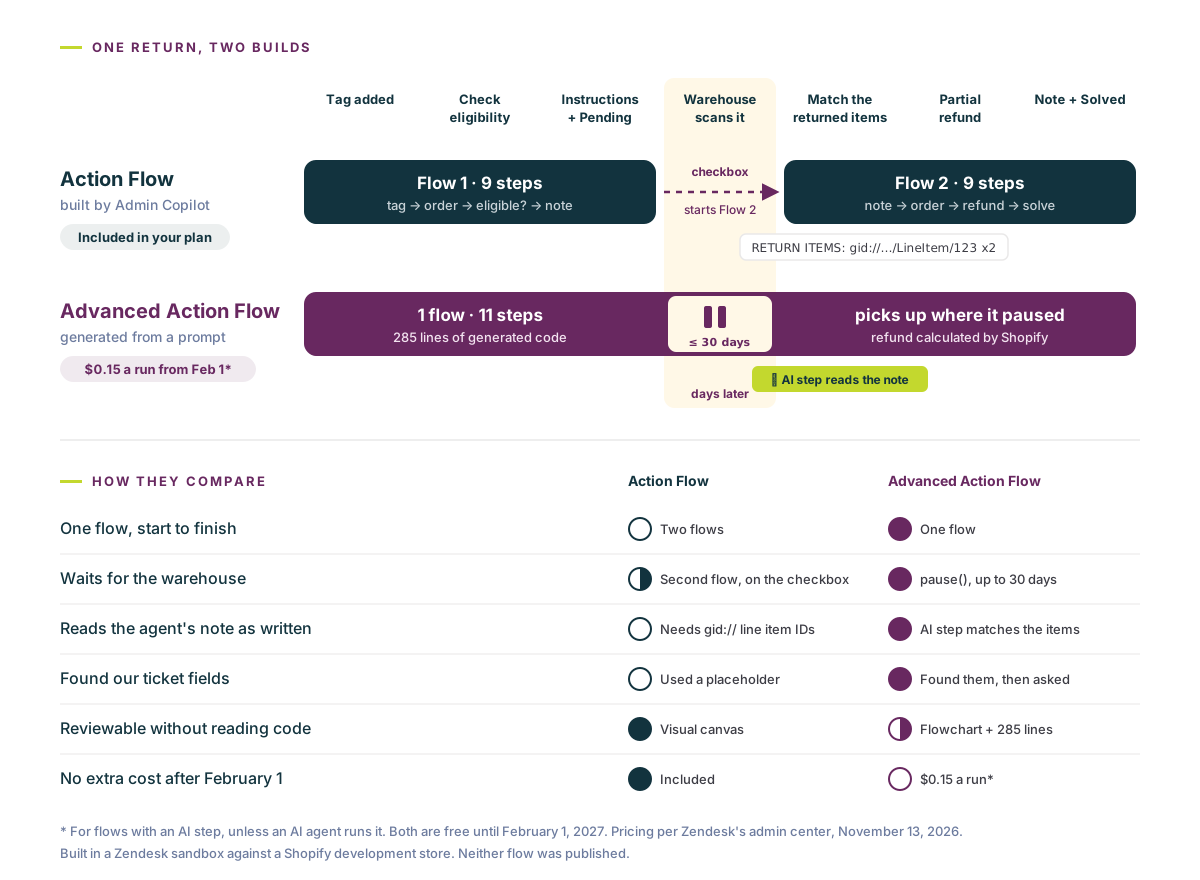
Step 4 is the trap. The rest happens in one sitting. Step 4 happens whenever the box shows up at the warehouse.
A few ground rules: we built both versions on November 13, saved both as drafts, and published neither. No real customer got a real refund for the sake of this post. You're welcome, finance.
Version 1: the Advanced Action Flow
An Advanced Action Flow starts from a sentence. Zendesk's pitch: "Admins describe the outcome they want in plain language and AI generates advanced action flow code and a visual flowchart."
We pasted in our six steps and hit Start building. Its first move was the right one. It refused to guess.
"I can't build this yet. Two fields you mentioned don't exist on this account's tickets, and the workflow depends on both." … "Also, is the value the customer-facing order number (like #1234) or Shopify's internal order ID (a long number like 5678901234)? They need different lookups."
The Advanced Action Flow builder, before writing a line of code
It had read our ticket fields, found no field called "Order number," and listed the five that might be it. It found no "Return received" checkbox either and told us where to create one. And it asked whether "refund" meant the whole order or just the returned items. Fair questions, all three. Plenty of humans wouldn't have asked them.
We answered, created the checkbox, and picked our Shopify connection. It then researched Shopify's refund API on its own, tried a read-only test lookup, and told us plainly that our connection came back with a 401 and no permissions, so it "couldn't confirm the Shopify connection works." Honest. Slightly embarrassing for us.
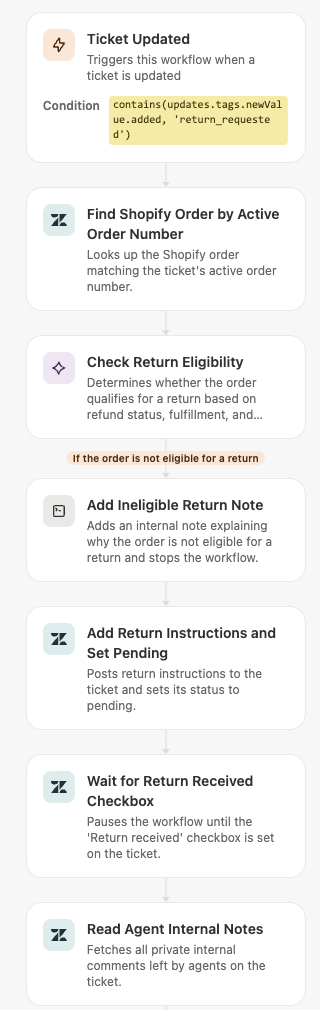
About four minutes after our first prompt, we had a draft: 11 steps, 285 lines of JavaScript, and a flowchart to match.
What it got right. The wait is a single line: the flow pauses until the ticket gets the return_received tag, then picks up where it left off. It used Shopify's refund calculation to refund just the returned items, without shipping. And it closed with a list of "decisions you should check" that a good engineer would have flagged: the return instructions are placeholder text, nothing gets restocked without a warehouse location, an unfulfilled order counts as ineligible, and Shopify will email the customer about the refund unless you turn that off.
What to watch.
- It's code. Readable code, but code. We spotted a check for the checkbox that probably never fires, because it looks for the field in the wrong place. The tag-based pause still covers it. Zendesk's own footer says it best: "AI can sometimes make mistakes. Review it carefully."
- The pause has a shelf life. Per Understanding advanced action flows, "A workflow can be paused for a maximum of 30 days. If the workflow fails to resume by that time, it fails." Slow returns need a plan B.
- It quietly added an AI step. To match "the blue one, size M" in an agent's note to Shopify line items, it calls an AI agent mid-flow. Smart. Also the difference between free and not free. More on that below.
- Permissions. It needed three Zendesk permissions approved (ticket read, ticket write, account settings read) and a Shopify connection with order write access before it could do anything at all.
When we hit Save, Zendesk threw confetti, which honestly felt earned after arm-wrestling an AI into building one simple workflow: "You've made an advanced action flow 🎉! You're on the way to effortless process management." Effortless, minus the three questions, one new ticket field, three permissions, a Shopify reconnect and a code review. But sure. Confetti.
Version 2: the Action Flow, built by Admin Copilot
For the standard version, we used Build action flows with admin copilot, the same plain-language start for the visual builder. We gave it the same spec, with our answers already folded in.
It went less smoothly.
- It couldn't find the order field. "The ticket fields list is too large," it said, and it couldn't find "Active order number," the field the other builder had found a few minutes earlier. Its fix was to use the "Return received" checkbox as a placeholder for the order number. Searching Shopify for order
trueis a bold strategy. - It split the job into two flows. Action Flows can't wait for the warehouse, so Admin Copilot built one flow for eligibility and a second one, triggered when the checkbox changes, for the refund. That's the right call for an Action Flow. It's also the clearest way to see what "advanced" buys you.
- The second flow didn't want to save. First "wasn't saved (no matching title)." Then it couldn't resolve the checkbox's field ID, which it had quoted to us itself a minute earlier. It finally saved with a temporary Run on demand trigger and a note to swap it later.
- Your agents get homework. With no AI step, the second flow parses the agent's note with custom code, in a format only a Shopify developer could love.
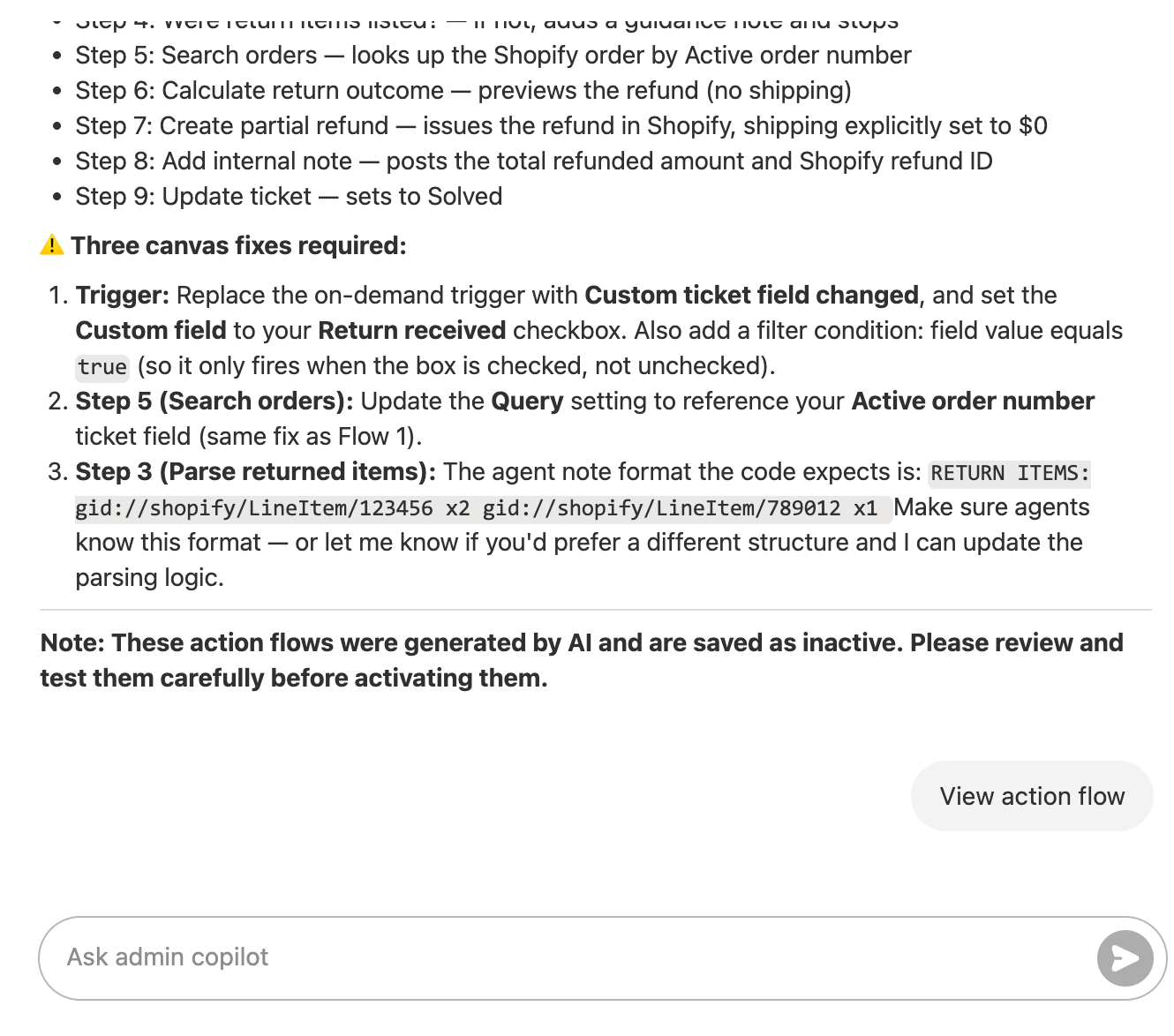
Nothing says "great customer experience" like an agent typing gid://shopify/LineItem/123456 x2 into a ticket.
And when we opened the second flow on the canvas, Zendesk greeted us with "Some fields couldn't be loaded" and cleared the order ID from both Shopify refund steps as "malformed data." Admin Copilot's own sign-off was the most accurate line of the day: "These action flows were generated by AI and are saved as inactive. Please review and test them carefully before activating them."
What it got right. The bones are good. It found Shopify actions we didn't expect, including Calculate return outcome and Create partial refund, so a partial refund without shipping is a native step, not a custom action. Everything is visible on a canvas your admins already know. And at run time there's no AI step, which matters for the next section. It took about six minutes and three Approve clicks.
Side by side comparison
| Action Flow (Admin Copilot) | Advanced Action Flow | |
|---|---|---|
| Build time | About 6 minutes, 3 approvals | About 4 minutes, one round of questions |
| Shape | Two flows, 9 steps each | One flow, 11 steps, 285 lines of code |
| Finding our fields | Couldn't; used placeholders | Found them, then asked which one we meant |
| Waiting for the warehouse | A second flow, triggered by the checkbox | pause() on the ticket tag, up to 30 days |
| Matching returned items | Custom code and a strict note format | An AI step that reads the agent's note |
| CRM and marketing status | ✗ N/A (custom action) | ✗ N/A (custom code) |
| Goodwill loyalty points | ✗ N/A (custom action) | ✗ N/A (custom code) |
| Partial refund | Native Shopify steps | Shopify's refund API, in code |
| Fixes before it can run | Three canvas fixes | Three permissions, a Shopify reconnect, a code review |
| After February 1 | Included | $0.15 a run, because of the AI step |
The CRM, marketing and loyalty rows are where real returns go next, and where both builders stop. They're also why we're building agnoStack's Action Flow Connectors for the Zendesk Action Builder, now close to early access (EAP): CRM, marketing, loyalty and much more as steps in the flow, not another custom integration.
What it costs...take five
There's no single pricing page for any of this. There are three (or at least three that we know of), but the reality is likely that Zendesk is still figuring this all out. Here's where it has landed for now:
- Action Flows are "included in all seat-based Suite and Support plans with no action credits, allowances, or usage limits."
- Advanced Action Flows are free until February 1. Zendesk's comparison says they consume "neither action credits nor model tokens unless you add an AI step."
- And Zendesk's welcome dialog (not yet its help articles) fills in the rest:
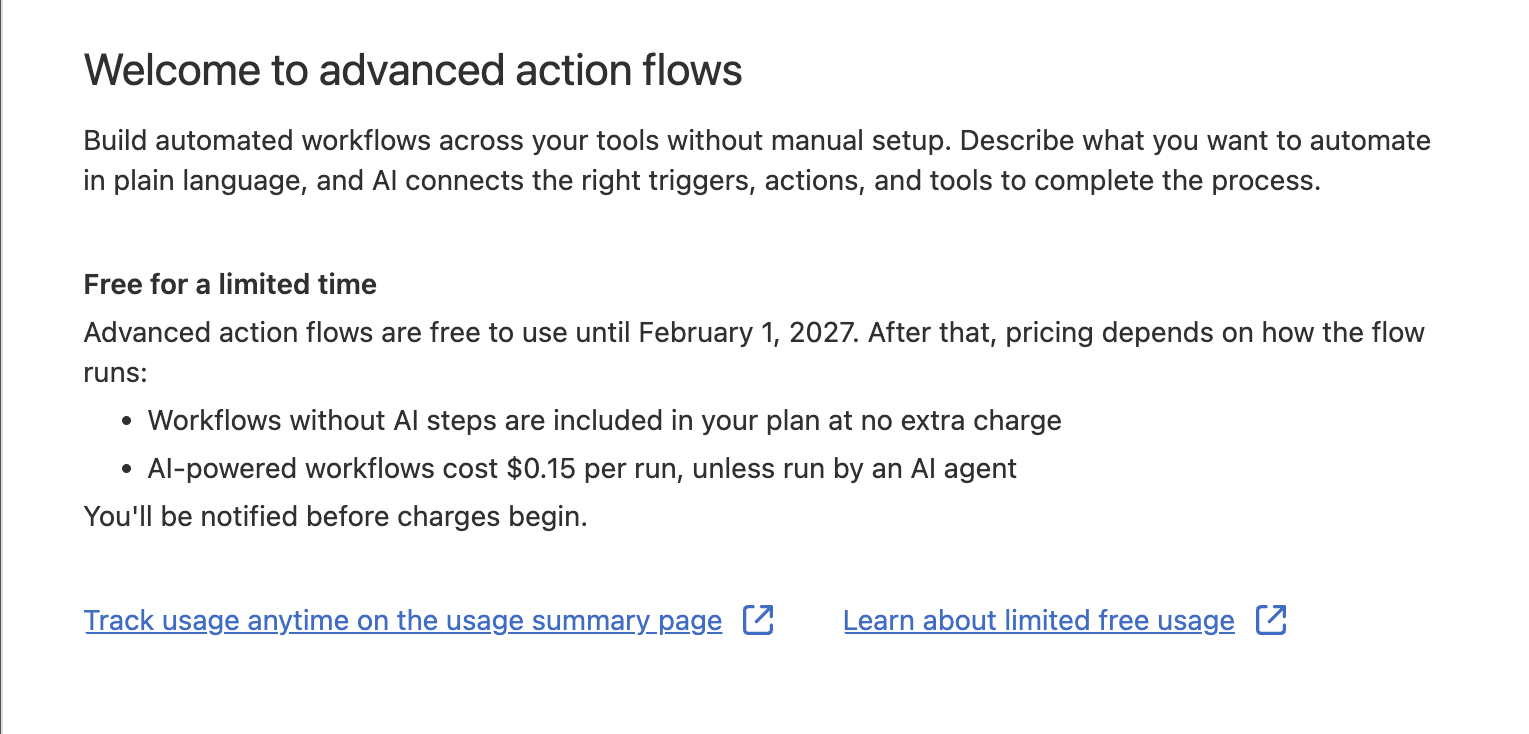
So our advanced flow, the one with the AI step, costs $0.15 a run after February 1, and it runs every time an agent tags a return. "Unless run by an AI agent"??? 🤔 Then it doesn't, and Zendesk hasn't said what that run counts as instead. Our Action Flow version costs nothing extra, but makes your agents type Shopify IDs.
Is that a lot? For one return, no. For a holiday season of returns, run the math. And keep an eye on Admin Center's usage summary, because "Usage will be charged from Feb 1, 2027." We're still working out how all of this fits together with Specialized AI Agents and Custom Agents, the AI agents most likely to be running these flows in the first place.
Which one to use
Our rule of thumb, for now:
- Use an Action Flow when the job finishes in one sitting and every step exists as an action. Lookups, notes, status changes, a refund an agent clicks.
- Use an Advanced Action Flow when the job has to wait on something outside Zendesk, needs judgment in the middle, or calls an API with no action. Just know that judgment is the part that's billed.
- Use both. A published Advanced Action Flow shows up in Action Flows as a custom action. Keep the front simple, and send the long-running part to the advanced one.
- On Zendesk Unlimited, check before you pick. "Included" applies to "seat-based" plans, and Unlimited doesn't have seats. It has an Outcome Budget that pays for work completed, and a refunded return looks an awful lot like work completed. Zendesk's Outcome AI Platform plan article lists Action Flows and Advanced Action Flows as included in the plan price, but doesn't say whether a run with an AI step draws on the Outcome Budget.
Either way, an admin still has to read what the AI built. Both builders said so, in writing, and both were right.
For support teams, the front door still matters most. agnoStack's Actionable Options let an agent start an Action Flow from the order panel in the ticket, with the order already in hand. No hunting for the right order field. No
gid://required. And with our Action Flow Connectors close to early access (EAP), the steps neither builder could take (the CRM, the marketing list, the loyalty points, the rest of a retailer's back office) become steps in the flow. That's what it takes for Specialized AI Agents to do what retailers actually need, and what their customers actually expect.
Both builders got us most of the way to a working return in under ten minutes. The last mile is still yours. So is the bill.
Sources
- https://support.zendesk.com/hc/en-us/articles/11369598506266-Comparing-action-flows-and-advanced-action-flows
- https://support.zendesk.com/hc/en-us/articles/11149728300186-Understanding-advanced-action-flows
- https://support.zendesk.com/hc/en-us/articles/11149761264666-Creating-advanced-action-flows
- https://support.zendesk.com/hc/en-us/articles/11508994027418-Announcing-the-general-availability-of-advanced-action-flows
- https://support.zendesk.com/hc/en-us/articles/11490813998618-Announcing-the-end-of-action-credit-pricing-for-action-flows
- https://support.zendesk.com/hc/en-us/articles/11111726294938-Announcing-an-update-to-action-credits-for-native-Zendesk-actions
- https://support.zendesk.com/hc/en-us/articles/11374506224410-Announcement-Try-new-AI-features-free-for-a-limited-time
- https://support.zendesk.com/hc/en-us/articles/8855601898266-Creating-action-flows-to-automate-processes-across-Zendesk-and-external-systems
- https://agnostack.com/release-notes/release-number/5-34-0#actionable-options
- https://support.zendesk.com/hc/en-us/articles/11212432066330
Keep reading
All posts →Blog
Zendesk action flows got cheaper: Marketplace connectors, MCP and credit-free native actions
In August, Zendesk opened a Marketplace section for action flow connectors and stopped charging action credits for native Zendesk actions. Here's what that means for commerce brands and their AI agents.

Blog
Zendesk Custom Agents: Specialized AI agents are only as good as the actions behind them
Zendesk introduced Specialized AI Agents on September 14: Industry Agents, starting with commerce, and Custom Agents built in Agent Builder. Here's what shipped, what's in early access, and what custom agents still need.
Engineering
Zendesk Bridge: How AI agents outside Zendesk handle tickets and orders
Zendesk Bridge connects AI agents like ChatGPT, Claude and Copilot to Zendesk over MCP and A2A. Here's how it works, how it governs what each agent can do, what's in early access, and how those agents act on orders outside Zendesk.