
Setting up Dotdigital
as your Marketing Provider
Connect Dotdigital to agnoStack in Zendesk: create a Dotdigital API user, then enter your API Region, API Email and API Password in agnoStack.
Connect Dotdigital to agnoStack in Zendesk: create a Dotdigital API user, then enter your API Region, API Email and API Password in agnoStack.
Zendesk can be integrated with Dotdigital through the free agnoStack Add-On Marketing Provider.
Dotdigital is a customer engagement platform that helps businesses create and manage personalized, data-driven marketing campaigns across multiple channels, including email, SMS, social and push notifications.
To connect Dotdigital, you'll need three values: your API Region, an API Email and an API Password.
API Email and API Password
Both values come from a Dotdigital API user, which you create as follows:
- Log in to your Dotdigital dashboard as the Account Owner.
- Expand the User menu in the bottom left and go to Settings → Access → API users.
- Select New User.
- The username (your API Email) is generated for you and must not be edited. You can add a description to identify this as your agnoStack API user.
- Enter an API Password and confirm it.
- For Status, select Enabled.
- Select Save.
API Region
When you set up Dotdigital in agnoStack, you'll be asked to select the API Region for your account. This is the region where your Dotdigital account is hosted.
| Region | API endpoint |
|---|---|
| Europe (r1) | r1-api.dotdigital.com |
| North America (r2) | r2-api.dotdigital.com |
| Asia Pacific (r3) | r3-api.dotdigital.com |
Note: Make sure you select the correct region for your account. You can't use an API endpoint that belongs to a different region; you'll get a 403 - Forbidden: Access is denied error instead.
Entering Your Credentials in agnoStack
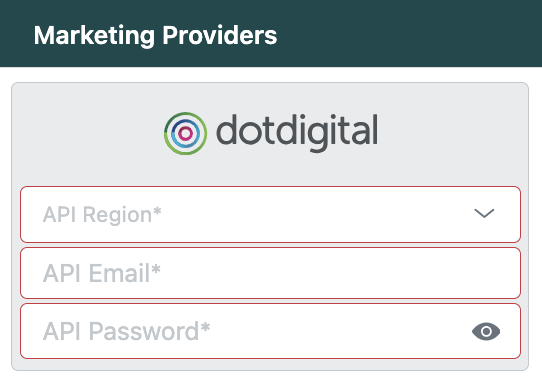
In Zendesk, open the agnoStack configuration panel (via the Manage Your Account link or the agnoStack icon in the left sidebar), select Dotdigital under Marketing Providers, and enter the following:
| Field | Value |
|---|---|
| API Region | The region where your Dotdigital account is hosted |
| API Email | Your Dotdigital API user's username |
| API Password | The password you set for the API user |
Continue through the rest of the configuration screens and click Activate to save your new Add-On configuration.
If you run into any trouble or need help, contact us any time at support@agnostack.com.